EXcoreEX's Gaming Blog

Monday, 7 November 2016

P2

Unit 78: Digital Graphics for Computer Game

P2 Be Able To Generate Concept Art Ideas For Computer Game Graphics


What Are Computer Game Graphics?

Print media graphics, such as game poster, game packaging. In-game graphics[heads-up display graphics, sprite graphics, background graphics, image textures]. Concept art graphics. Refer to my other work. follow the link here to go directly to my blog à Click Me


What Is Graphic Specification

Visual style, eg colour, style, photorealistic, cel-shaded, anime. Technical considerations, eg file format, file size, optimisation , file naming conventions, asset management, intended output. Refer to my other work. Follow the link here to go directly to my blog à Click Me 
Posted by Unknown at 07:34 No comments:
Email ThisBlogThis!Share to XShare to FacebookShare to Pinterest

Monday, 3 October 2016

Bitmap and Vector graphics

Image result for vector graphics

Vector

Vector graphics use polygons to represent an image on the computer. vector graphics use nodes or points. These points or nodes have their own x and y axes which determine the placement. The nodes and points also have their own attributes such as shape, colour, thickness etc.


Bitmap/raster graphics

A bitmap/raster image is a image made up of little dots that make up the structure. Each little dot has their own value such as colour and their intensity. if you was to zoom into a bitmap/raster graphic it will lose its resolution and you will be able to see each individual pixel. But if you was to zoom into a vector image it will not lose its resolution and you will not be able to see the pixels.Image result for raster graphics


Posted by Unknown at 05:11 1 comment:
Email ThisBlogThis!Share to XShare to FacebookShare to Pinterest

Sunday, 2 October 2016

Understand Theory+Application of Digital Graphics for Computer Games


Unit 78: Digital Graphics for Computer Games

Understand Theory+Application of Digital Graphics for Computer Games


Picture Resolution

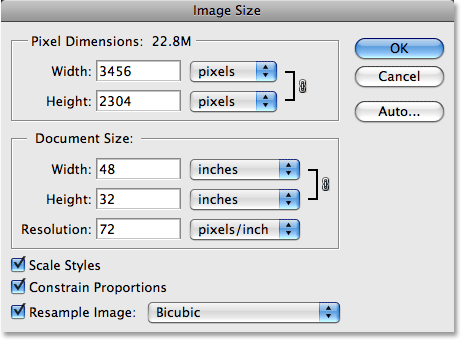
Photoshop's Image Size dialog boxPicture resolution has nothing to do with how your image looks but has to do with how your image will print. Picture resolution is how many of your images pixels from top to bottom, left to right will print on every inch of the paper. When a image is opened in Photoshop the Picture Resolution is split into two sections, Pixel dimensions and document size, as shown here:


Image Resolution

Image Resolution in other words is the quality of an image. If the resolution(quality) goes up then the image will become clearer. The image will become sharper and more detailed as well as becoming clearer. Image Resolution have a limited number of dots. Different platforms have different resolution depending on when they were made. Here is an example of Image Resolution:

Image result for image resolution
This image shows different types of resolution. As you can see the one on the left is high res and the one on the right is low res, as shown by the pixels being shown.

Intensity

Image result for 8-bit and 64-bitEach pixel has a pixel value. In other words it tells you how bright the pixel is and/or what color/shade the pixel is. The more common pixel format that is used is the byte image. If you have an image that is 8-byte, it will be lower in quality than an image that is 64-byte. Here is an example of how the quality of pixels have increased over the years:

The image shows Mario, the famous mascot of Nintendo, and how as the years go on from 1981 to 2008 you can clearly see that the the pixels were intense in a way you can clearly see each pixel but is not in a way where its hard to see each pixel.






Posted by Unknown at 10:50 No comments:
Email ThisBlogThis!Share to XShare to FacebookShare to Pinterest

Monday, 26 September 2016

Unit 78: Digital Solutions for Computer Games

Unit 78: Digital Solutions for Computer Games


Concept art

Concept art is illustration technique used in games  to show the ideas of the creator and/or is used to show progress in not only the games design but the level of skill the creator has in illustration. Concept art can also be used to act as a backup just in case something doesn't go to plan you always have a design close to the finished product. Concept art can also be implemented into games as a extra feature which is always cool! Here is a example of concept art:


Pixel Art

Pixel Art is another art style commonly used in games that are 2D or side scrollers. It is also used to make sprites for the characters or items. One of the most popular series that uses pixel art and sprites is the Pokemon series. Here is a image of one of a Pokemon games showing the pixel art:

Texture Art

Texture art is a art style used in games to create depth and make a object sometimes look realistic. Texture art also makes objects more immersive, drawing in the player separating 2 dimensional from 3 dimensional. Here is a example of Texture art in gaming:

Background images

Background images are mostly but not limited to 2 dimensional games. Background images are used to add depth and make the player feel like there is more beyond the barriers of the game instead of it just being a empty abyss. Here is an example of background images from the popular game Super Mario Bros:


In Game Interface

In game interfaces are used in a way to send the player information without the need to pause or open any menus. Here is a example of a in game interface from the game Minecraft:


Print Media

Print Media is a form of a marketing technique that creators use to make their game stand out. The aim for Print media is to draw in and catch the eye of players to make them buy their game. Print media is used in posters, Box art, Game covers etc. Here is an example of Print media on a game cover:
Posted by Unknown at 14:56 No comments:
Email ThisBlogThis!Share to XShare to FacebookShare to Pinterest

L3 Games Design Unit 78: Digital Graphics for Computer Games Artistic Style

L3 Games Design

Unit 78:Digital Graphics for Computer Games

Artistic Style


Exaggeration
Image result for legends of zelda triforce heroesExaggeration is an art style that is used in games mostly such as MMO RPGs, and Japanese culture such as anime and manga. This art style is used in games, anime and manga due to how the art style exaggerates certain elements of the characters such as their large eyes or crazy hair styles. This is as shown with The Legends of Zelda Triforce Heroes because all three Links have exaggerated eyes and hair as seen in this image here:

The reason why games, anime and manga use this type of art style is because it can also show emotions and character features very well for example if the character is happy there eyes would probably be larger and more cheerful and if they are angry their eyes would probably be small and squinted etc.

Photorealism

Image result for photorealism in gamesPhotorealism is an art style that is used in games to create a realistic feel to them to separate virtual from reality. This is shown here:

At first glance it may look real but as the image implies its not a photo. This is an example of photorealism that is used commonly in games such as Battlefield and Call of Duty to make the player think they are not just an NPC or a character they are actually a person.
Image result for battlefield 1The image here is a character from the soon to be released game Battlefield one. As you can see the character looks highly realistic and this is another example of photorealism,
Pixelated art style
Image result for rayman pixel artPixelated is a art style using pixels to create a visual graphic such as characters. Using pixels in games creates a retro type look. Pixelated art style is mostly used in older games but is and can be used in newer games. Pixel art games usually have a limited colour pallet. Here is and example of Pixel art in games:

Cell Shading

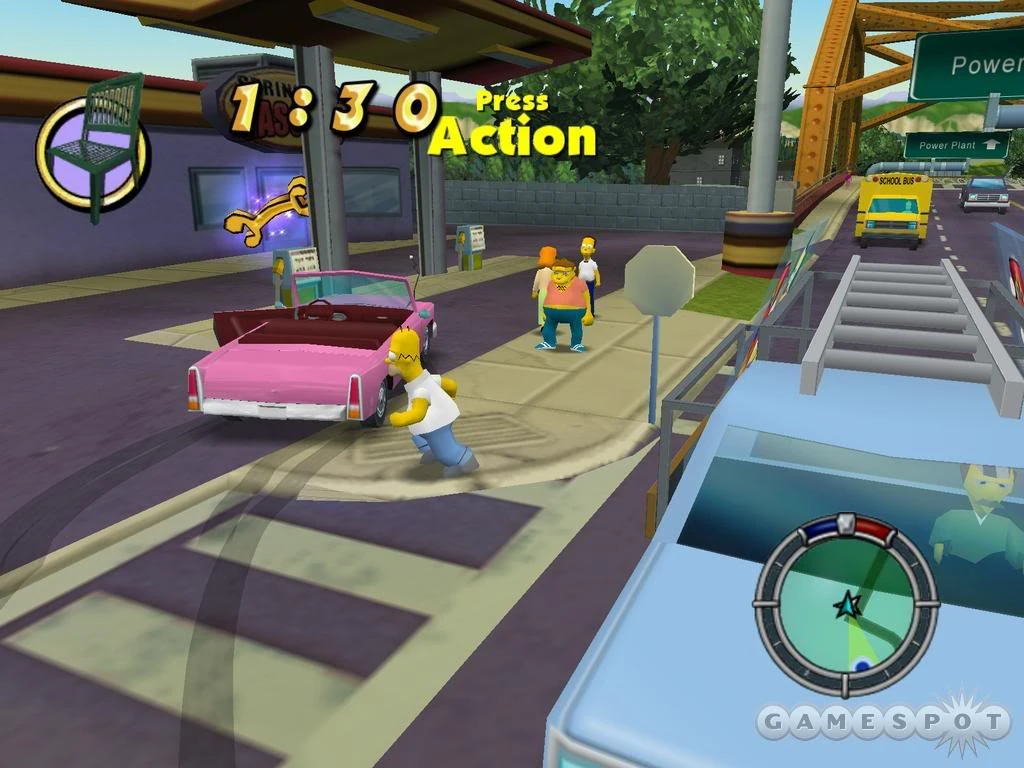
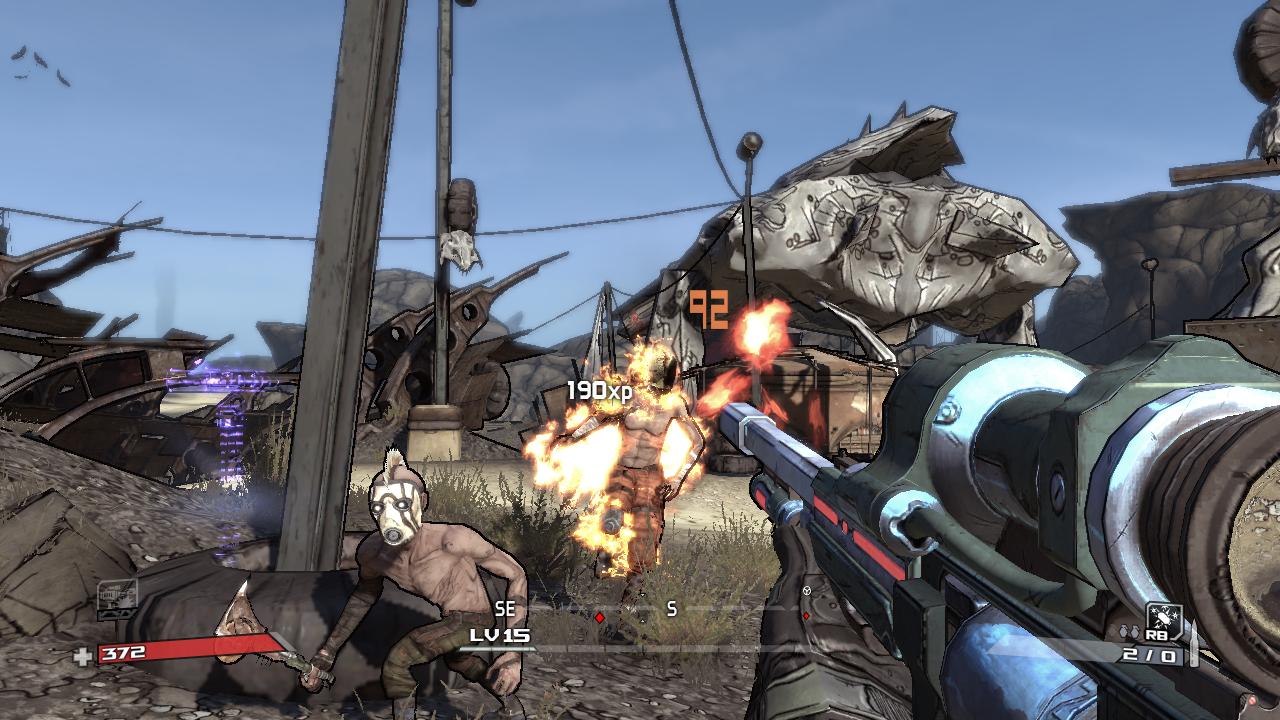
Image result for simpsons hit and runImage result for borderlandsCell Shading is a art style commonly used in cartoons and animation. But is not common in computer games unless it is a game that is based off of a cartoon or animation. One of the most popular cell shaded games in the next gen era is Borderlands but the most popular in the more older generations of console is Simpsons: Hit and Run.


Posted by Unknown at 08:04 No comments:
Email ThisBlogThis!Share to XShare to FacebookShare to Pinterest

Friday, 16 September 2016

My Gaming Machines-Then & Now

My Gaming Machines-Then & Now


Gameboy

The Gameboy was released in the EU on the 28 September 1990. I enjoyed this gaming platform because it was easy to travel with you could just place it in your bag or pocket and carry it anywhere with you. The stuff I didn't enjoy consist of the graphics, this is because it was black and white, and the battery life, this is because it would go for hours if you charged it fully, meaning more game time! The main thing i didn't enjoy about the Gameboy was that it didn't have an illuminated screen, so unless you had a light you could barely see what your doing.

Image result for gameboy shutting off gif

My favourite game for the Gameboy was Pokemon Yellow, unlike the other Pokemon games such as Pokemon Red and Blue, in Yellow you would have a Pikachu following you around as you enjoy your Pokemon adventure!
These are the specs for the Gameboy:
Central Processing Unit (CPU)8 Bit, Clock frequency: 4.19 MHz, RAM: 8 Kbytes

Dimensions148 x 90 x 32 mm

Weight220 g

Power consumption70 - 80 mA hr. 4 AA batteries (1.5 V)

Playing timeUp to 30 hours

Screen typeLiquid crystal screen (LCD)

Screen size4,7 x 4,3 cm

Screen resolution160 x 144 Pixels

Game PaksExchangeable

Contrast controllerYes

Loudspeaker controllerYes

Headphone connectionYes, stereo sound via headphones

ColoursGrey, transparent, black, white, red, green, yellow, blue

Cable connectionYes (large)

Special featuresLED battery charge display

This is where I got my information from:

https://www.nintendo.co.uk/Support/Game-Boy-Pocket-Color/Product-information/Technical-data/Technical-data-619585.html

3DS

The 3DS or 3 Developers System, was released on February 26th 2011 in Japan but later released worldwide on March the same year. I enjoy this platform because it has 2 screens and for games such as Pokemon it makes the menu easier to use for example you will be playing on the top screen and accessing the menu on the bottom without having the need to pause. I also enjoy this platform because it has a 3D option implemented into the 3DS without the need to wear 3D glasses. The one thing I dislike about this platform is the battery life as it states that the battery life is five hours but can only achieve around three?
My favourite game for the 3DS is Super Smash brothers Brawl because it combines big characters such as Mario, Link and Pikachu and makes them fight off in a battle to win!

The specs for the 3DS are as follow:

Key Specs

 
GAME FORMAT
Downloadable, Cartridge
DIRECTION CONTROL
D-pad, Thumb stick
MOTION CONTROLS
yes
CAMERA
yes
ONLINE FEATURES
Multiplayer, Store, Browser
General
GAME FORMAT
Downloadable, Cartridge (2048 MB)
BACKWARD COMPATIBLe
yes (1 generations)
Display
SECONDARY DISPLAY
yes
Controls / accessories
DIRECTION CONTROL
D-pad, Thumb stick (1)
MOTION CONTROLS
yes (Accelerometer, Camera / optical)
CAMERA
yes (Internal) (0.3 megapixels)
OTHER PERIPHERALS
Array
Sound
SPEAKERS
Stereo
AUDIO JACK
3.5mm
Media playback
PHOTO VIEWER
yes
AUDIO PLAYBACK
yes (AAC, MP3)
VIDEO PLAYBACK
yes
Networking / online service
WIFI
yes (802.11b, 802.11g) (WEP, WPA, WPA2)
ONLINE FEATURES
Array
DOWNLOADABLE CONTENT
Array
Storage
INTERNAL STORAGE
yes
MEMORY CARD SUPPORT
yes (SD)
Hardware
CPU SPEEd
266 MHz
GPU SPEED
133 MHz
VIDEO RAM
4 MB
SYSTEM RAM
64 MB
INTERNAL ROM
1536 MB
USB
None
Power
BATTERY SIZE
Rechargeable (Li-ion)
Comparison
Although the Gameboy was my first platform and has some great things going with it such as the battery, it doesn't quite fit in with the 3DS as there is two screens, a 3D feature, better games and cameras.


Posted by Unknown at 04:11 No comments:
Email ThisBlogThis!Share to XShare to FacebookShare to Pinterest
Home
Subscribe to: Comments (Atom)

About Me

Unknown
View my complete profile

Blog Archive

  • ▼  2016 (6)
    • ▼  November (1)
      • P2
    • ►  October (2)
    • ►  September (3)
Travel theme. Powered by Blogger.