Unit 78: Digital Graphics for Computer Games
Understand Theory+Application of Digital Graphics for Computer Games
Picture Resolution

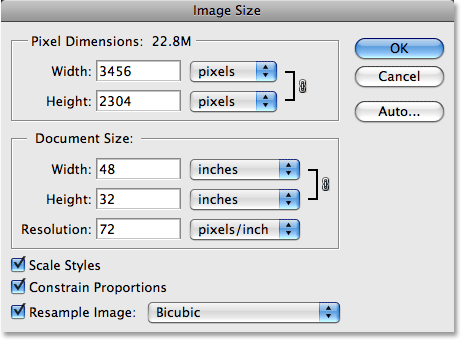
Picture resolution has nothing to do with how your image looks but has to do with how your image will print. Picture resolution is how many of your images pixels from top to bottom, left to right will print on every inch of the paper. When a image is opened in Photoshop the Picture Resolution is split into two sections, Pixel dimensions and document size, as shown here:
Image Resolution
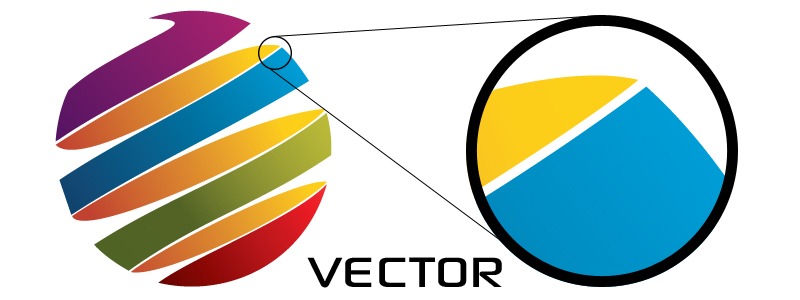
Image Resolution in other words is the quality of an image. If the resolution(quality) goes up then the image will become clearer. The image will become sharper and more detailed as well as becoming clearer. Image Resolution have a limited number of dots. Different platforms have different resolution depending on when they were made. Here is an example of Image Resolution:
This image shows different types of resolution. As you can see the one on the left is high res and the one on the right is low res, as shown by the pixels being shown.
Intensity

Each pixel has a pixel value. In other words it tells you how bright the pixel is and/or what color/shade the pixel is. The more common pixel format that is used is the byte image. If you have an image that is 8-byte, it will be lower in quality than an image that is 64-byte. Here is an example of how the quality of pixels have increased over the years:
The image shows Mario, the famous mascot of Nintendo, and how as the years go on from 1981 to 2008 you can clearly see that the the pixels were intense in a way you can clearly see each pixel but is not in a way where its hard to see each pixel.




 The image here is a character from the soon to be released game Battlefield one. As you can see the character looks highly realistic and this is another example of photorealism,